Pointer Bench
Benchmark Report
Pointerbench: GUI grounding for real-world office tasks
Pointerbench tests whether a model can point to the right place on screenshots from spreadsheets, text surfaces, and professional applications.
At Warmwind, we build agents for office work. These agents do not only call APIs or read clean web pages. They look at applications, choose a target, click it, type into it, and move through workflows. You see this kind of work in Google Docs, Excel, Slack, Canva, SAP, Salesforce, and internal tools (Warmwind OS, Warmwind closed beta announcement).
But we do not stop there. We work on robotics control policies and continuous action spaces: multiple actions give smoother control than single executions at a time.
But pointer models still matter. An LLM can plan a step such as “click submit,” but a policy still has to convert that intent into a screen location before the agent can act. That grounding step is the pointer model, which is why it shows up in evaluation, small or offline deployments, fallbacks, and agent systems that already plan with an LLM but have no reliable way to locate the target on screen.
Pointerbench tests one narrow skill: given a screen and an instruction, return usable geometry: a point for a click task, a box for an area task.
Pointerbench is for anyone building computer-use systems, whether they call a large VLM through an API, fine-tune a small pointer model, or use it as an evaluation layer for a continuous controller. In each case it measures the same thing: whether the model can ground an action on the screen. A strong score does not imply general computer-use competence, but it does show that the model handles spreadsheets, text, colors, boundaries, relative positions, and professional UI targets, which is close to the work many teams need to automate.
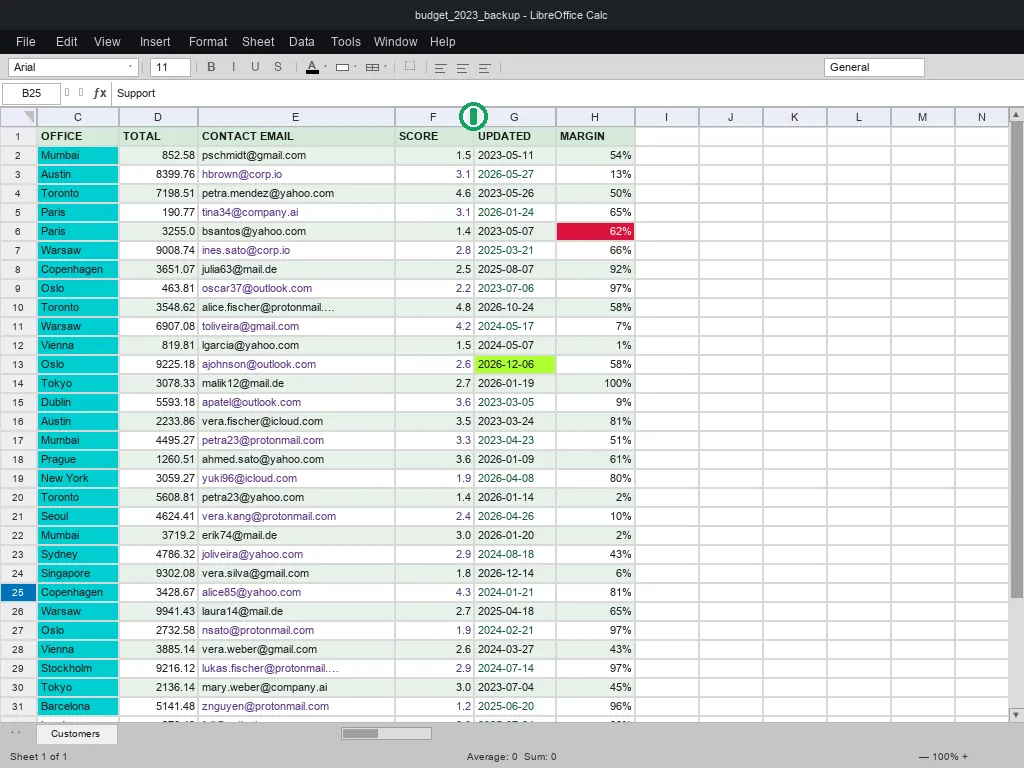
It is also a demanding test of visual understanding in general, not only of clicking. The sheet tasks make this concrete: current VLMs still misread which color fills a spreadsheet cell or where a column border sits, even though the questions are simple. A model that misses those has not understood the screen; it has learned where common controls tend to sit.
We have trained a small pointer model for this kind of work and will publish it in a later release.
Why another benchmark?
ScreenSpot and ScreenSpot-Pro did important work. ScreenSpot-Pro moved GUI grounding into professional software. It covers 23 applications, 5 work categories, and 3 operating systems. In the original setting, existing models reached only 18.9 percent (ScreenSpot-Pro overview). The paper also shows that small targets and dense interfaces remain hard (ScreenSpot-Pro OpenReview).
Scores have since climbed steeply. At the time of this release the top public entries on the ScreenSpot-Pro leaderboard reach about 80.9 percent (ScreenSpot-Pro leaderboard), up from 18.9 percent. Fast saturation of a single benchmark makes it hard to tell whether models learned general GUI grounding or fit the distribution of that one benchmark. We built Pointerbench in part to test that difference on a separate, out-of-distribution set of tasks.
That direction is useful, but it leaves a gap: the work people ask us to automate is not mostly “click a clean web button.” It is office work: spreadsheets, documents, email, text fields, internal tools, and professional desktop applications.
In these environments, the target is often not an object. It can be a gridline, a cell corner, a caret position, a colored status cell, or a spreadsheet position such as “three rows below A5.” Object detection does not fit these cases well. It requires labels for too many pixels, edges, and insertion points.
Agents usually work inside one surface
Benchmarks that cover Windows, macOS, and Linux often suggest that production agents drive a full desktop. In practice, they usually do not. Most agent work happens inside a controlled surface: a browser tab, one application window, a cropped screenshot, or a rendered document, with one task on that surface.
That also matches how companies wire automation today. Tools such as n8n, UiPath, Make, and Zapier run the workflow. The model handles a scoped step on a specific surface. If you test the whole operating system, you give too much weight to desktop chrome that the agent rarely touches. Pointerbench focuses on the repeated unit of work: find the right target inside the given surface. Pointerbench-Pro still records platform, but it scores the captured surface, not the whole desktop.
Annotation ambiguity
Existing GUI grounding benchmarks also contain ambiguous prompts. A human can see more than one valid click target, but the benchmark accepts only one. Sometimes the prompt does not say enough to identify a single target.
These cases are not just model errors. They are label problems: the benchmark measures how well the model guesses one hidden label rather than cursor skill. Very high scores on datasets with many such cases may partly reflect data leakage or benchmark memorization rather than grounding ability.
The screenshots below are taken from ScreenSpot and ScreenSpot-Pro; the coloured labels are our own annotations, not model output. In each case the green marker is the single target the benchmark accepts, and every Also valid marker is a different target that satisfies the same instruction but is still scored as wrong.

Repeated label: get free trial
The same action appears twice: once in the top navigation and once in the hero area. Both clicks make sense unless the prompt gives a location.
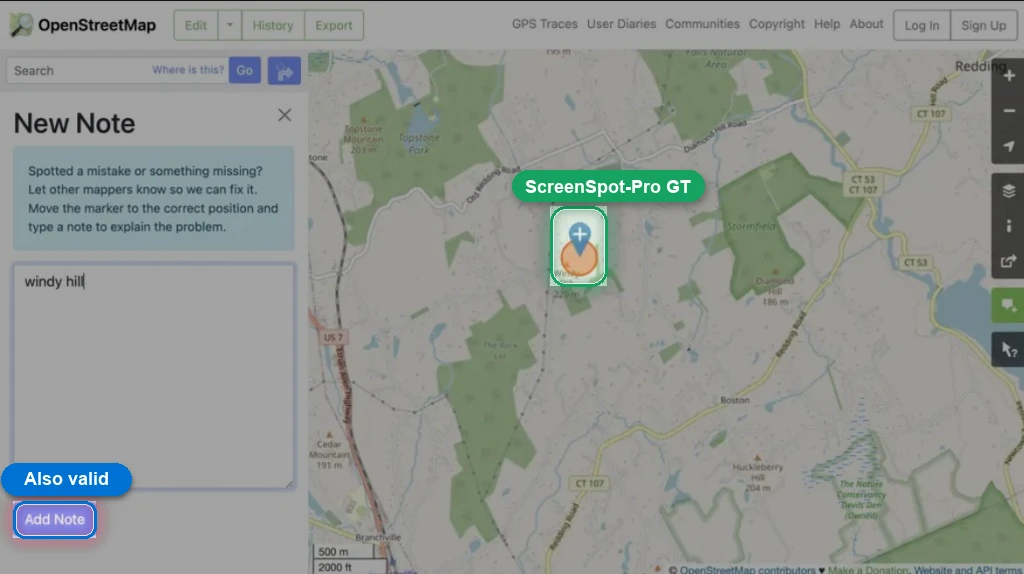
Debatable ground truth: add a note for the place on the map
This looks like a wrong label rather than ambiguity. The note panel is open and the text is already typed, so pressing Add Note is the natural action. The accepted label points to the map marker instead, so a reasonable action is scored wrong.
ScreenSpot-Pro ground truthAlso valid
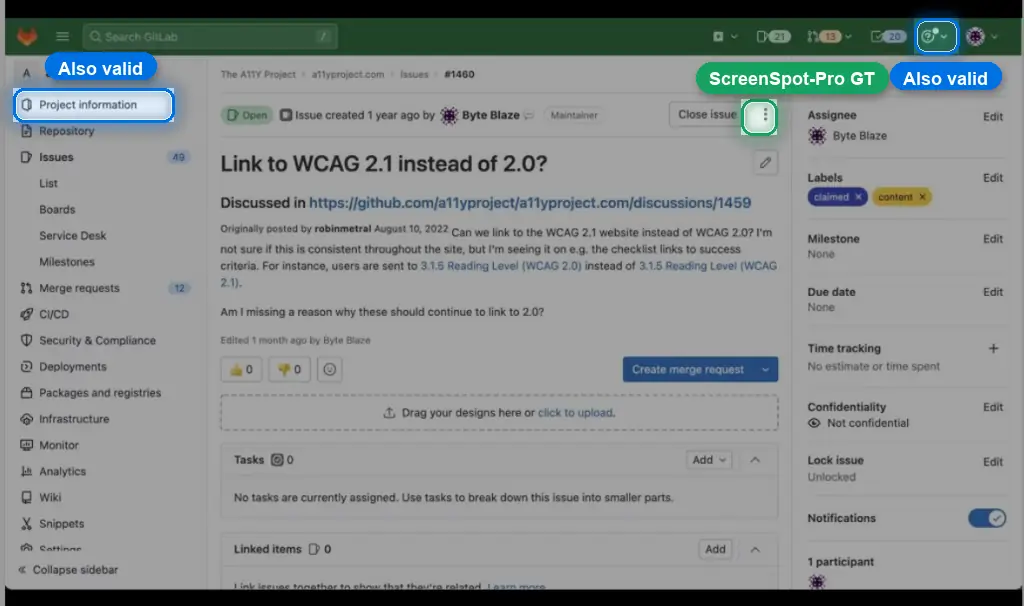
Unclear object: more information
The instruction does not say what the information refers to. The project, the issue, and the help menu all fit the words. The benchmark accepts only the issue action menu, so the other two reasonable reads count as wrong.
ScreenSpot-Pro ground truthAlso valid
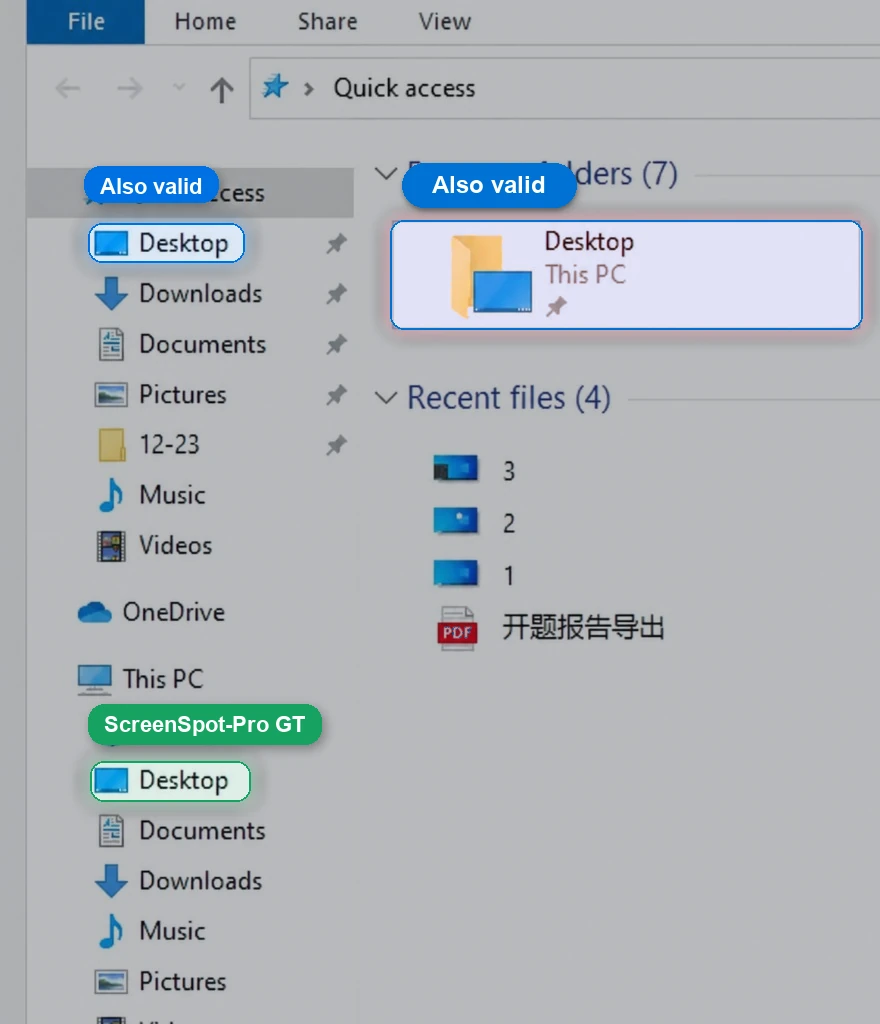
Duplicate navigation target: go to the desktop
File Explorer shows Desktop three times: in Quick access, as a large tile, and lower in the sidebar. All three open Desktop. ScreenSpot-Pro accepts only the lower sidebar entry, so the other correct routes become false negatives.
Also validScreenSpot-Pro ground truth
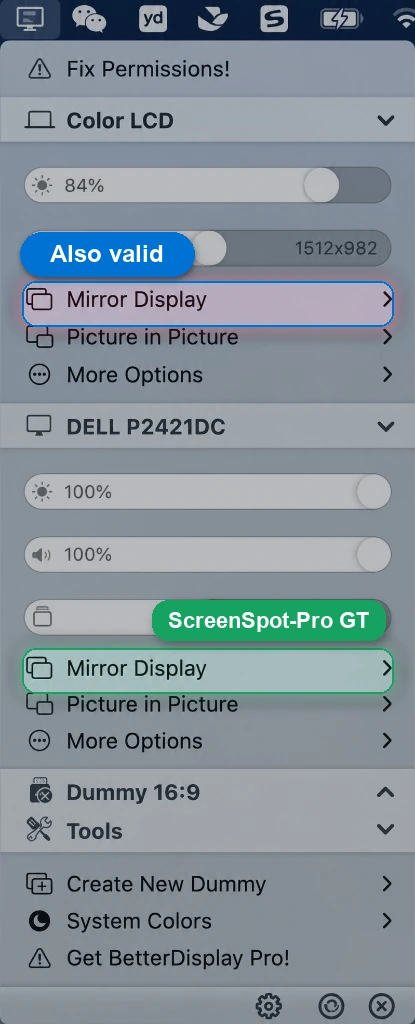
Repeated setting: set mirror display
The menu shows Mirror Display twice, once for each display. Both rows match the instruction. ScreenSpot-Pro accepts only the DELL P2421DC row, so the Color LCD row counts as wrong.
Also validScreenSpot-Pro ground truth
Color grounding is worse than it looks
Color carries real meaning in spreadsheets: status cells, warning rows, approval states, and project categories. Models still confuse nearby colors and often select an adjacent color instead of the requested one.
Pointerbench-Sheets includes 56 color tasks across cells, rows, columns, and bands. Most screens deliberately contain a nearby distractor color: the model must read the requested color, not just find the largest colored region.
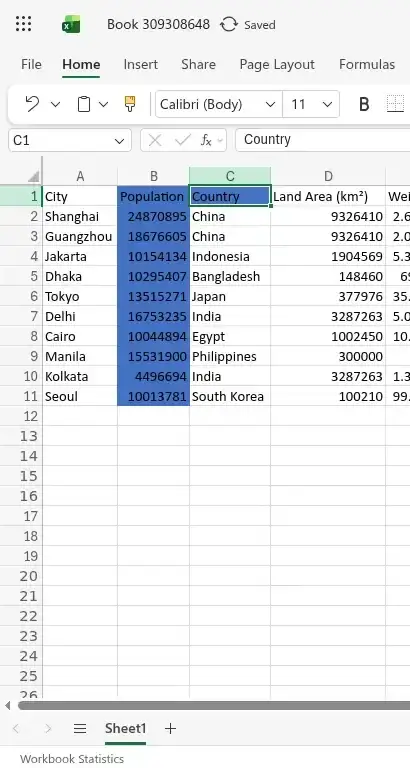
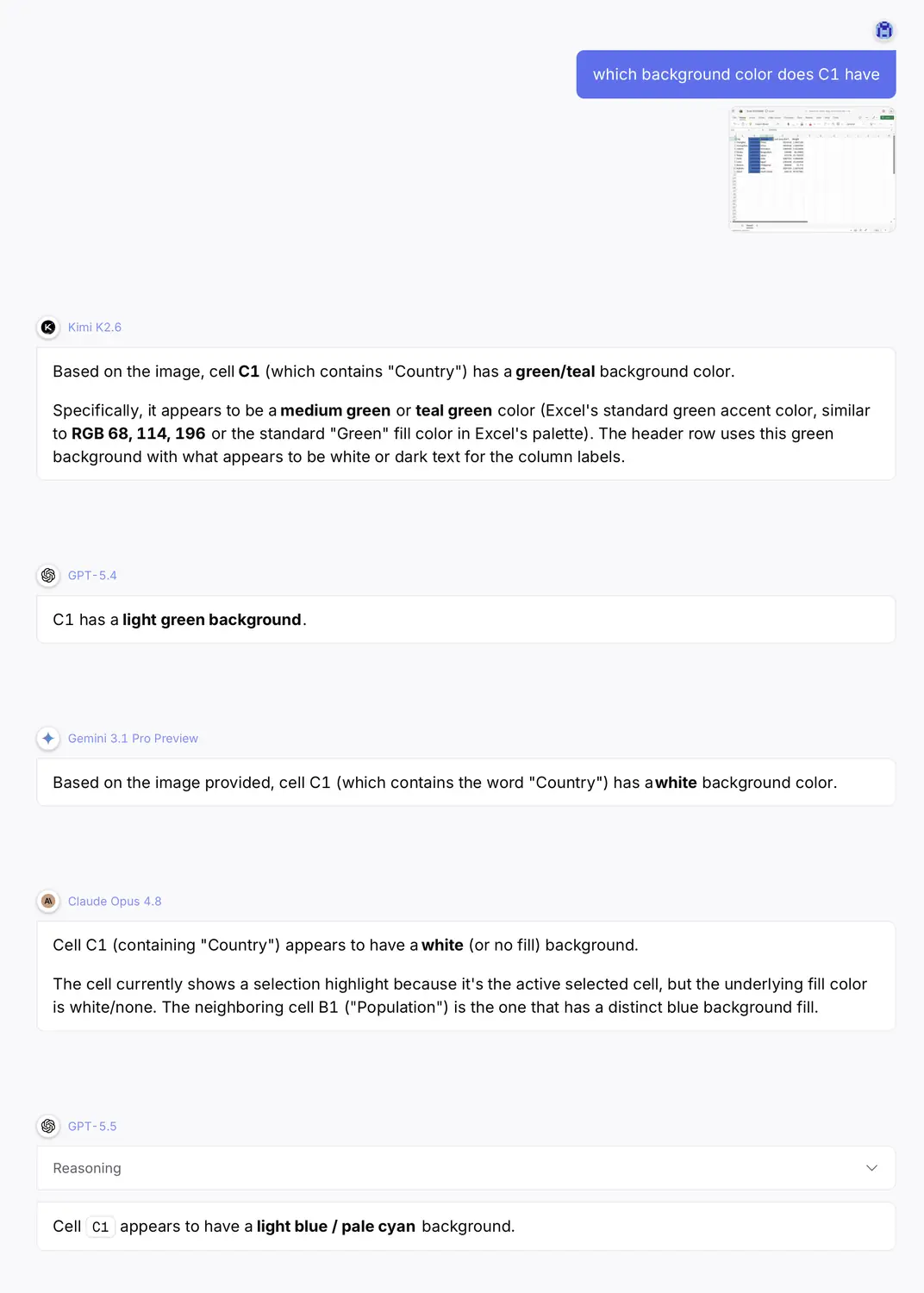
VLM failurecolorspreadsheet
Prompt
Correct answer
Several current VLMs answer this incorrectly: green, teal, light green, white, or pale cyan. The green selection outline and the highlighted column header distract them from the actual fill color of C1.
If a model cannot follow color instructions, it fails many spreadsheet workflows. We report color cases separately so this weakness does not disappear inside an average.
What we are releasing
Pointerbench has three public GUI grounding benchmarks. Each record has one image, one instruction, target geometry in absolute pixels, and a binary evaluator. Point tasks use point-in-bbox scoring. Bbox tasks, currently used in Pointerbench-Text, use an asymmetric overlap rule: the ground truth must be almost fully covered (coverage at least 0.90) while the prediction stays reasonably tight around it (precision at least 0.70). Cutting off part of the target is penalised far more than wrapping it with some margin.
Pointerbench-Sheets
Spreadsheet grounding: cells, colors, headers, edges, corners, and relative positions.
500 examples
Pointerbench-Text
Text grounding: words, glyphs, punctuation, caret positions, chrome labels, and text bounding boxes.
500 examples
Pointerbench-Pro
Professional app grounding: icons, text, and mixed GUI targets across 100 apps.
500 examples
The benchmark is available now: GitHub repository and Hugging Face dataset.
First leaderboard
The first release will report each benchmark separately. A single average hides useful information: whether a model handles spreadsheets, text and carets, or professional app interfaces.
To add your model to the official benchmark leaderboard, contact Warmwind.
The table ranks models by the reported average across the three subbenchmarks. Cells are shaded by score.
| Rank | Model | Sheets | Text | Pro | Average |
|---|---|---|---|---|---|
| 1 | anthropic/claude-fable-5 |
96.0% | 58.4% | 80.8% | 78.7% |
| 2 | warmwind/pointer-1.6 (agentic) |
87.8% | 66.8% | 76.8% | 77.1% |
| 3 | anthropic/claude-sonnet-4.6 |
82.6% | 47.8% | 77.4% | 69.3% |
| 4 | anthropic/claude-opus-4.8 |
82.2% | 44.4% | 80.2% | 68.9% |
| 5 | warmwind/pointer-1.6 |
77.0% | 49.2% | 76.8% | 67.7% |
| 6 | openai/gpt-5.6-sol-pro |
92.0% | 32.0% | 72.0% | 65.3% |
| 7 | openai/gpt-5.6-sol |
92.0% | 30.0% | 74.0% | 65.3% |
| 8 | anthropic/claude-opus-4.7 |
73.8% | 36.2% | 75.4% | 61.8% |
| 9 | openai/gpt-5.5 |
72.4% | 31.4% | 75.8% | 59.9% |
| 10 | openai/gpt-5.6-terra-pro |
52.0% | 20.0% | 74.0% | 48.7% |
| 11 | openai/gpt-5.6-terra |
50.0% | 22.0% | 70.0% | 47.3% |
| 12 | openai/gpt-5.4 |
63.2% | 25.0% | 50.4% | 46.2% |
| 13 | openai/gpt-5.6-luna |
56.0% | 20.0% | 60.0% | 45.3% |
| 14 | openai/gpt-5.6-luna-pro |
54.0% | 18.0% | 62.0% | 44.7% |
| 15 | openai/gpt-5 |
35.2% | 13.6% | 20.2% | 23.0% |
| 16 | x-ai/grok-4.20-multi-agent |
10.6% | 1.4% | 10.0% | 7.3% |
| 17 | moonshotai/kimi-k2.5 |
10.8% | 3.4% | 3.0% | 5.7% |
| 18 | openai/gpt-5-mini |
6.0% | 1.4% | 5.8% | 4.4% |
| 19 | moonshotai/kimi-k2.6 |
5.6% | 2.8% | 2.8% | 3.7% |
| 20 | qwen/qwen3.7-plus |
5.8% | 0.6% | 3.0% | 3.1% |
| 21 | qwen/qwen3.6-flash |
4.2% | 1.2% | 2.6% | 2.7% |
| 22 | minimax/minimax-m3 |
3.6% | 0.4% | 3.6% | 2.5% |
| 23 | qwen/qwen3.6-plus |
3.0% | 0.6% | 3.6% | 2.4% |
| 24 | qwen/qwen3-vl-235b-a22b-thinking |
2.6% | 0.4% | 3.2% | 2.1% |
| 25 | qwen/qwen3.5-9b |
2.0% | 0.2% | 2.6% | 1.6% |
| 26 | google/gemini-3.5-flash |
3.4% | 0.6% | 0.6% | 1.5% |
| 27 | openai/gpt-5-nano |
2.0% | 0.2% | 1.6% | 1.3% |
| 28 | moonshotai/kimi-k2.7-code |
0.4% | 1.8% | 0.8% | 1.0% |
| 29 | x-ai/grok-4.3 |
1.2% | 0.0% | 0.0% | 0.4% |
| 30 | google/gemini-3.1-pro-preview |
0.0% | 0.2% | 0.4% | 0.2% |
| 31 | google/gemini-3.1-pro-preview-customtools |
0.0% | 0.4% | 0.0% | 0.1% |
| 32 | stepfun/step-3.7-flash |
0.0% | 0.0% | 0.2% | 0.1% |
| 33 | x-ai/grok-build-0.1 |
0.0% | 0.0% | 0.0% | 0.0% |
| 34 | xiaomi/mimo-v2.5 |
0.0% | 0.0% | 0.0% | 0.0% |
| Center-click baseline | 0.4% | 0.2% | 0.2% | 0.3% |
At the top of the table, Claude Fable 5 leads with a 78.7 percent average (96.0 on Sheets, 58.4 on Text, 80.8 on Pro), followed by our Pointer 1.6 in agentic mode at 77.1 percent. The GPT-5.6 Sol variants reach 65.3 percent, alongside the Claude 4.x models between 61.8 and 69.3 percent. Text is the hardest subset for every model: even the strongest entries lose 20 to 40 points there compared to Sheets, because caret positions and tight bounding boxes demand character-level localization. No model is close to saturating the suite.
Two things explain the low end of the table. First, several models often returned no parseable coordinate, which counts as a miss. Out of 500 examples per subbenchmark, Grok Build 0.1 and MiMo v2.5 returned nothing usable on every example in all three subbenchmarks, Grok 4.3 on all 500 Pro and 468 Text examples, Gemini 3.1 Pro on 357 Text examples, and Gemini 3.5 Flash on 319 Pro examples. Second, the center-click baseline always clicks the middle of the image, so it marks the score floor for a model with no real grounding.
The two benchmarks also rank models differently, which is the reason we report Pointerbench next to ScreenSpot-Pro rather than as a replacement. Qwen3.7-Plus reaches about 79 percent on ScreenSpot-Pro, fourth on the public leaderboard, but 3.1 percent on Pointerbench, with 5.8 percent on Sheets, 0.6 percent on Text, and 3.0 percent on Pro. That places it among the weakest models in the table above rather than near the 78.7 percent at the top. Anthropic and GPT models are the main exception: they rank near the top of both. A high ScreenSpot-Pro score therefore does not imply general grounding on its own; a model can fit one benchmark’s distribution without transferring to a broader set of pointing tasks.
Why some strong ScreenSpot-Pro models fail here
The effect we lean on is a loss of output freedom. A model tuned to click GUI targets learns to place its prediction on the center of a salient control: a button, a menu item, an input field, an icon. Across many training examples this is reinforced until little probability mass is left for anything else.
Its attention then acts like a magnet, and the common GUI elements are iron: the prediction is pulled onto the nearest button, label, or field and cannot settle on white space, an edge, or a gap between characters. Coordinates outside the training distribution become effectively unreachable, whatever the instruction says. An instruction like “point to the empty area next to the button” fails, because the model has learned to predict the center of controls, not the space beside them.
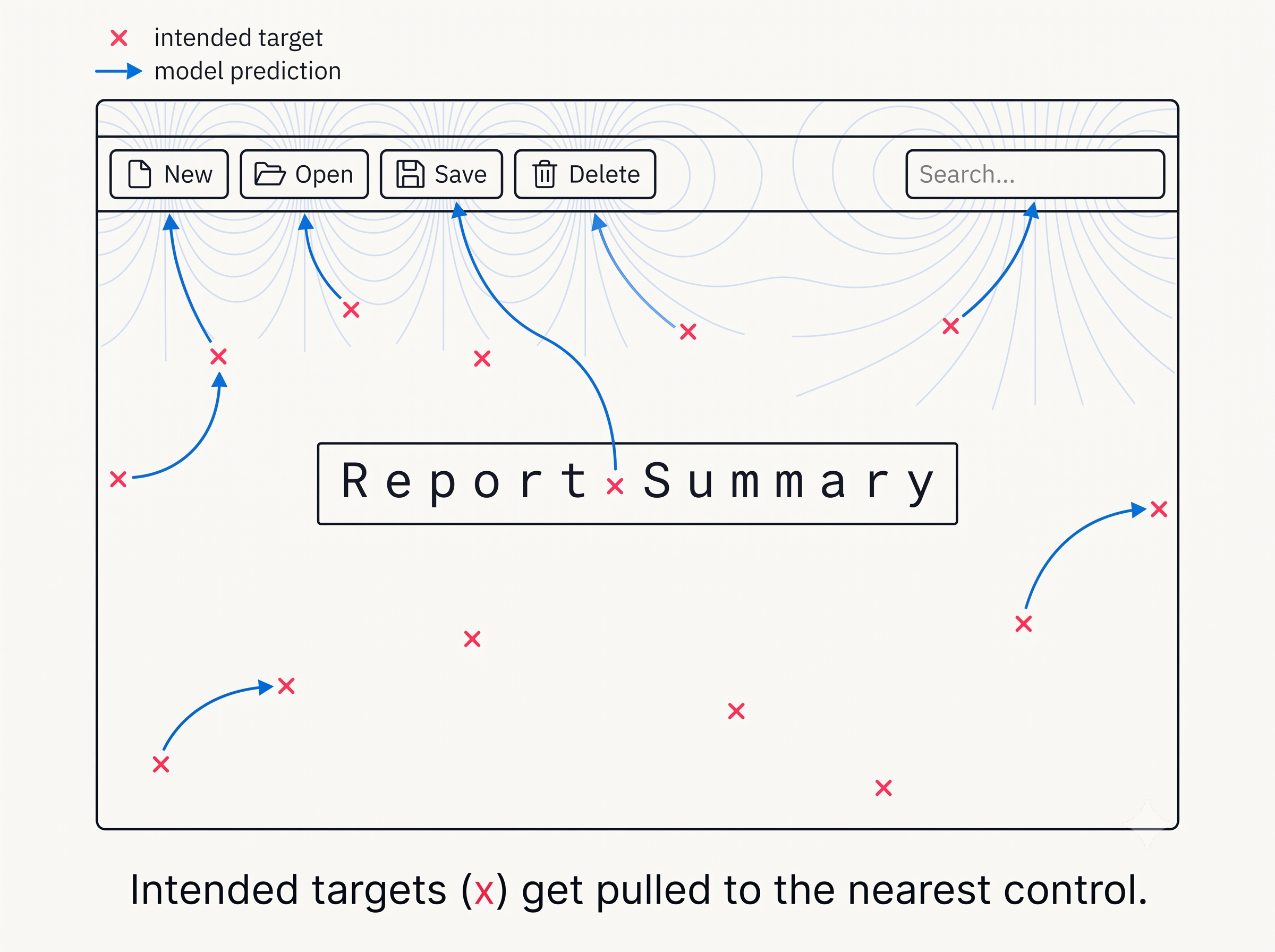
Pointerbench includes these off-element targets on purpose. Tasks such as “point to the left border of the cell”, “place the caret between two letters”, and the edge, corner, and relative-offset categories all require a coordinate that is not the center of a familiar element, which is exactly what a collapsed output space cannot produce.
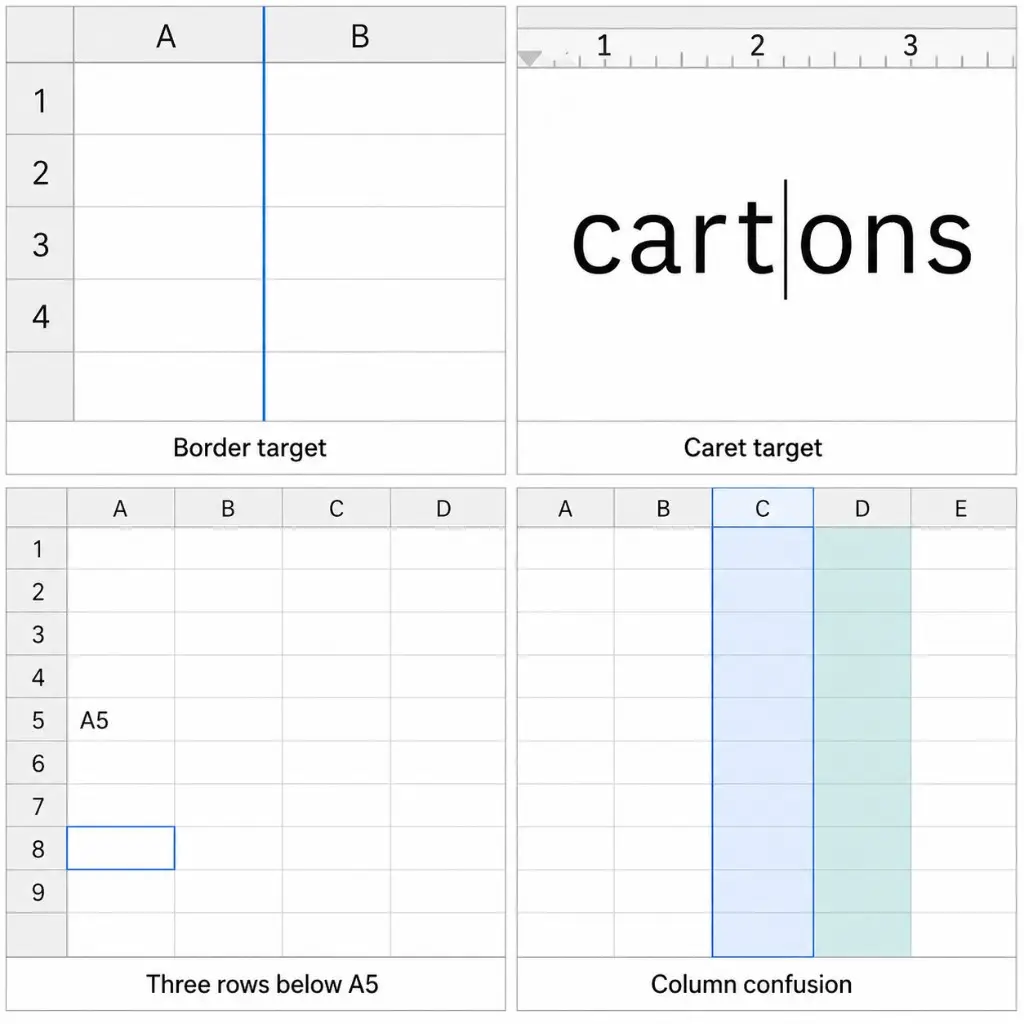
Inference Protocol
All screenshots are 1024×768. The scorer expects absolute pixel coordinates in that image frame, with the origin at the top-left. If you resize, crop, or use a zoom loop during inference, convert the final answer back to 1024×768 before scoring and report that choice with your result.
The GitHub repo includes a default prompt helper:
python eval.py --show-system-promptRecommended system prompt:
You are evaluating Pointerbench, a GUI grounding benchmark. You will receive one 1024x768 screenshot and one task instruction. Use absolute pixel coordinates with origin at the top-left of the image. Do not return normalized coordinates. Do not crop or resize the coordinate frame. For point tasks, return JSON like {"point": [x, y]}. For bounding-box tasks, return JSON like {"bbox": [x0, y0, x1, y1]}, where [x0, y0] is the top-left corner and [x1, y1] is the bottom-right corner.You can edit the prompt for your model or inference stack, but keep the coordinate frame fixed so scores stay comparable.
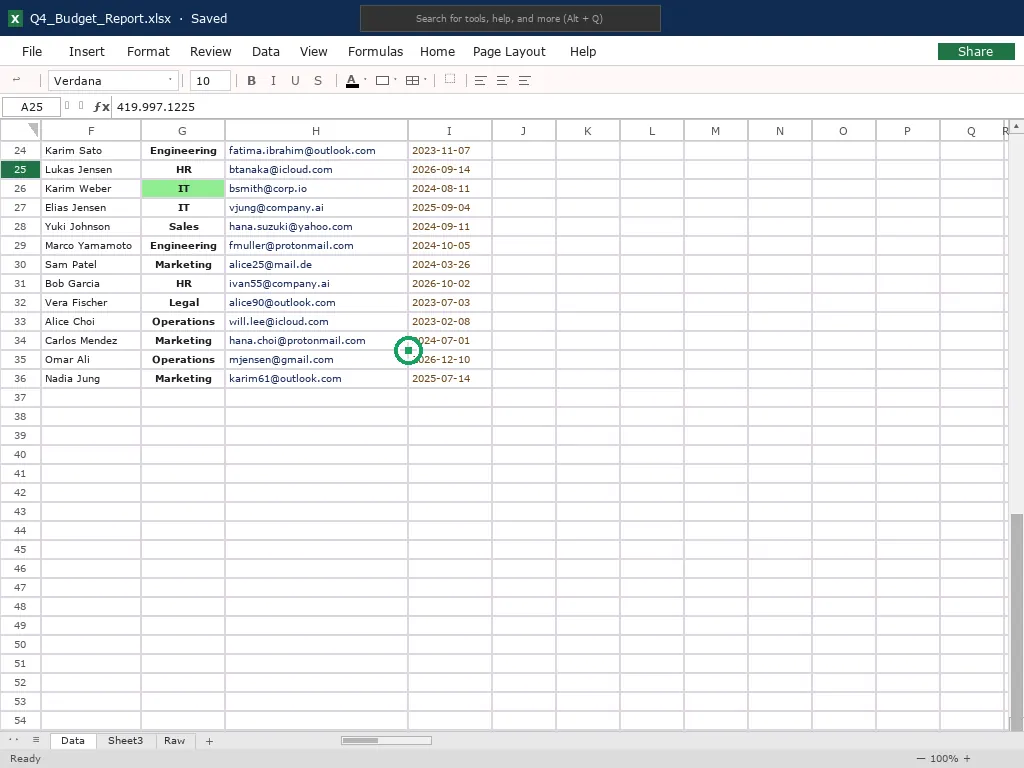
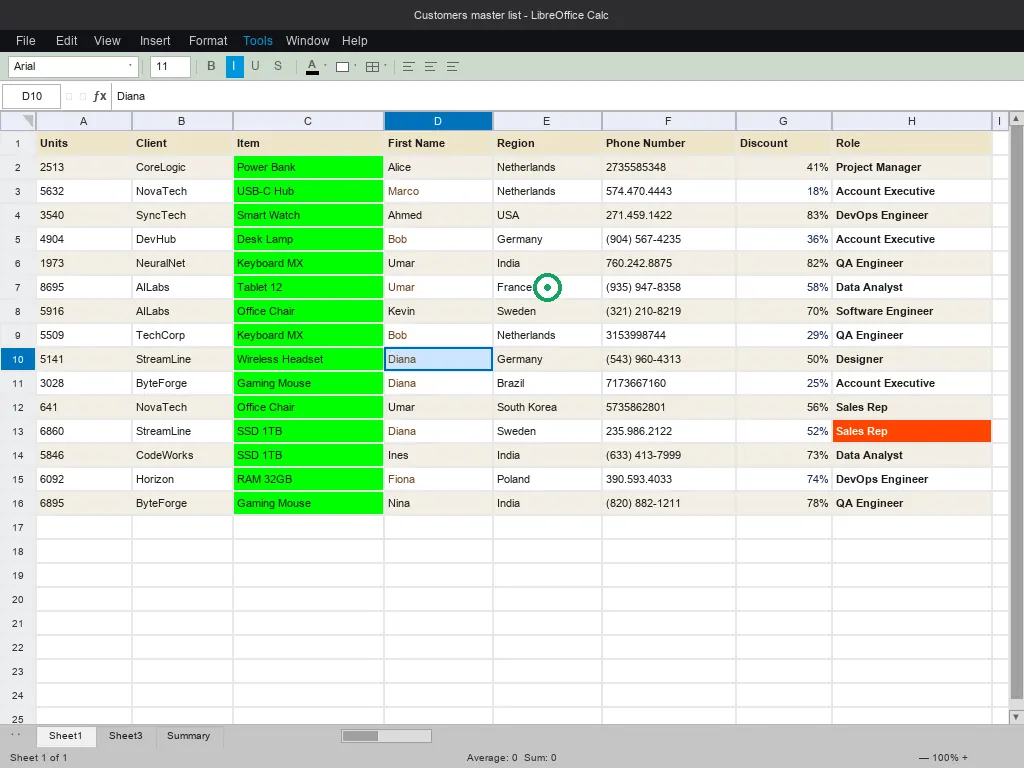
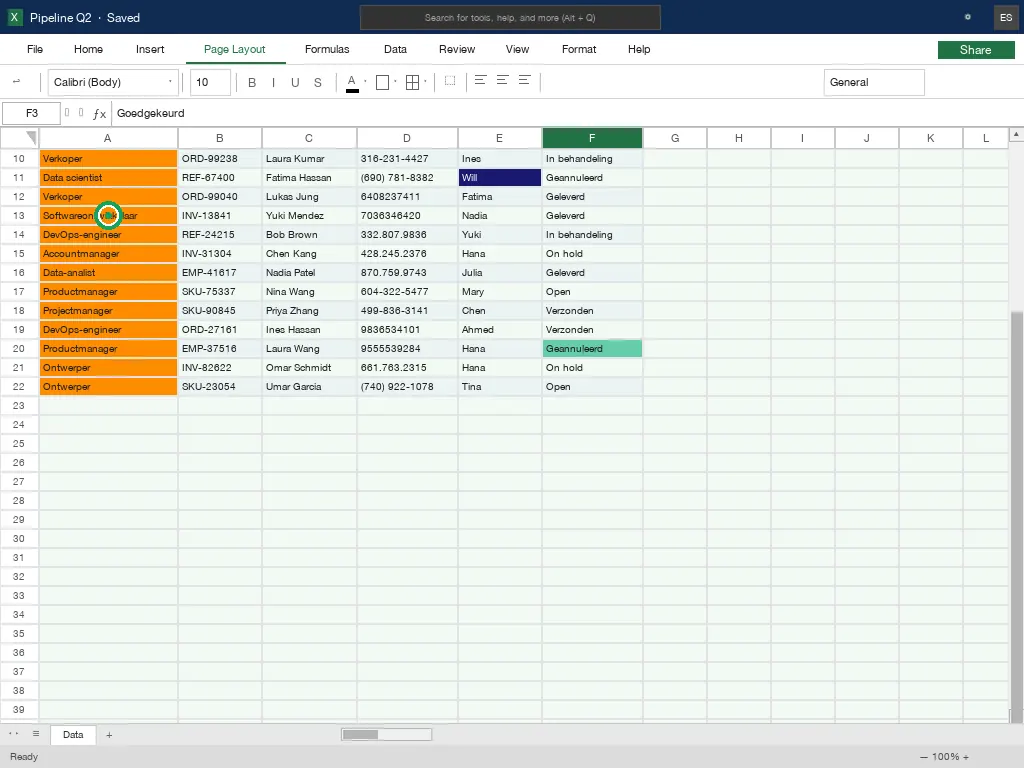
Pointerbench-Sheets
Spreadsheets are common in office work. They are also hard for GUI grounding. A sheet has dense grids, repeated cells, row and column labels, scroll offsets, colors, resize handles, grid edges, cell corners, and relative references.
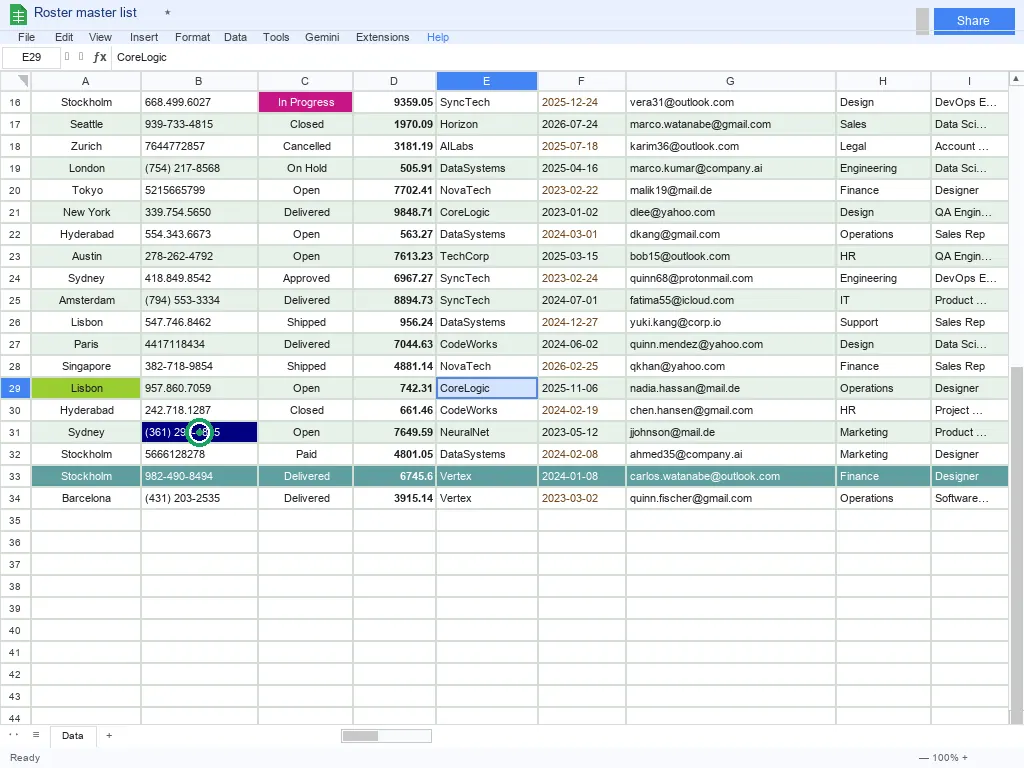
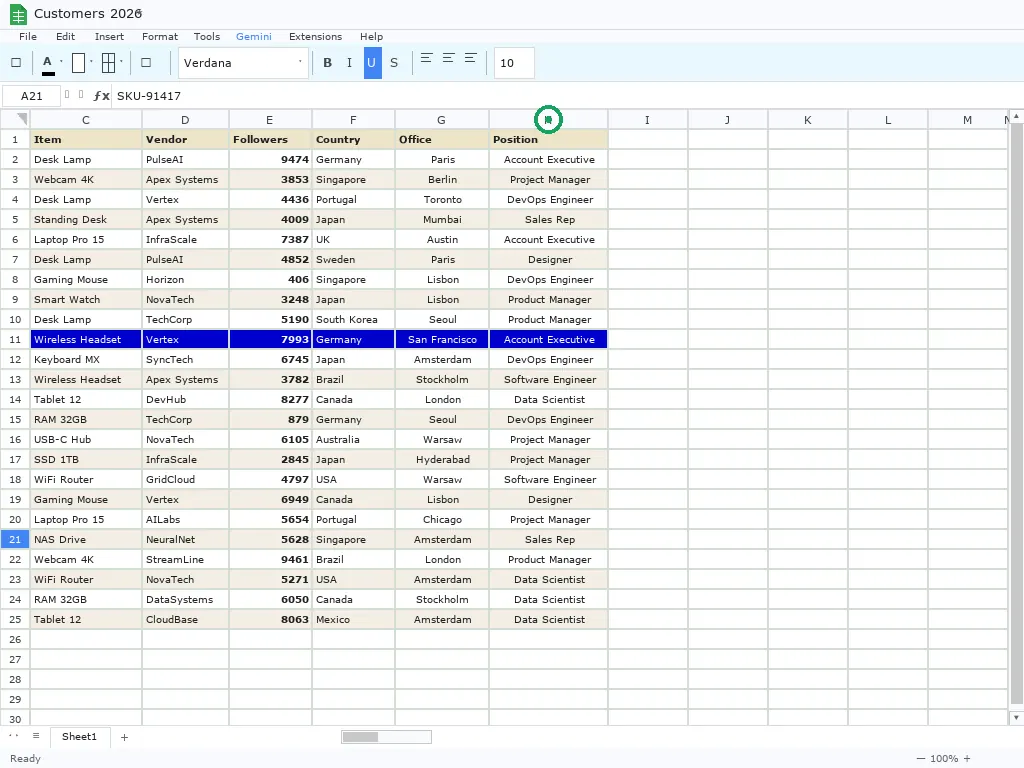
We make this benchmark synthetic on purpose. Many models have seen Excel-like screenshots during training. They can learn shortcuts: A1 sits near this pixel, row numbers start here, the first column is visible. Pointerbench-Sheets removes those shortcuts. The visible grid does not always start at A1. Rows and columns scroll. The style changes. Some examples remove app chrome completely. Edge, corner, color, and relative tasks test whether the model understands the sheet structure.
| Data type | Count | Share | Categories |
|---|---|---|---|
| Cell | 170 | 34.0% |
cell_ref 82cell_ref_content 45cell_content 43
|
| Edge | 116 | 23.2% |
col_resize_handle 43row_resize_handle 32cell_right_edge 22cell_bottom_edge 19
|
| Relative | 60 | 12.0% |
cell_relative_offset 33cell_relative_row 27
|
| Header | 59 | 11.8% |
col_header 35row_header 24
|
| Color | 56 | 11.2% |
cell_color 56
|
| Corner | 39 | 7.8% |
cell_bottom_left_corner 13cell_bottom_right_corner 12cell_top_left_corner 9cell_top_right_corner 5
|
Example instructions:
Choose cell E11.Click the row that is colored red.Resize column I from its right edge.Place the cursor on B37's bottom-right grid intersection.From G10, go 3 columns left, then 3 rows down.
Selected examples
Pointerbench-Text
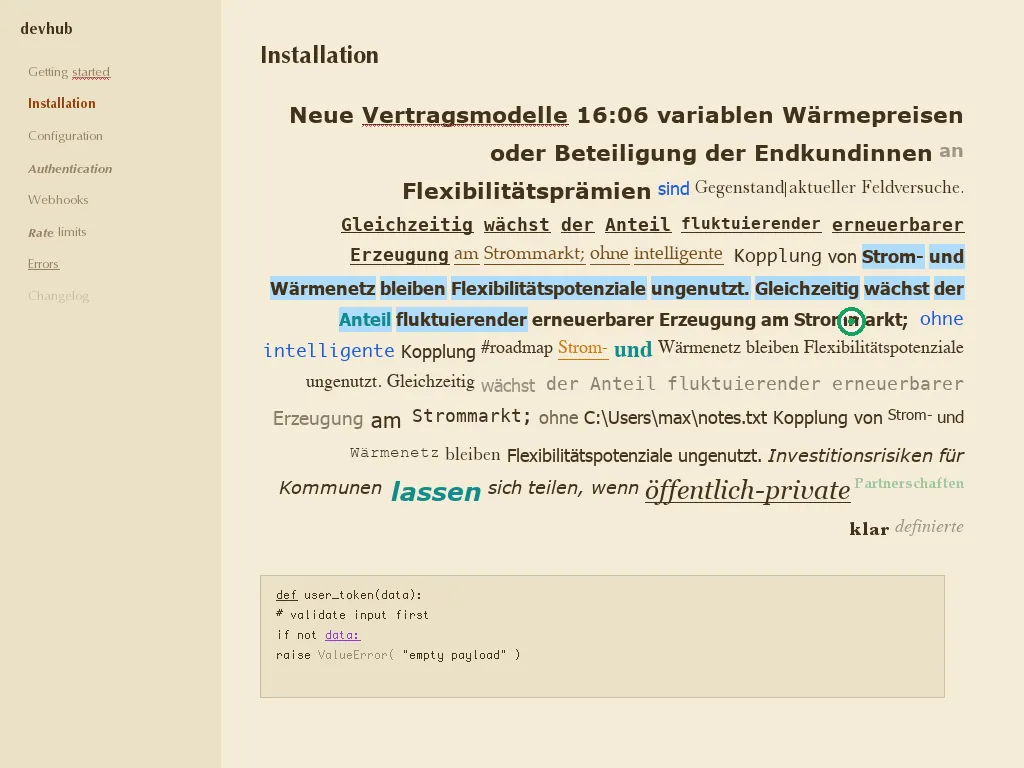
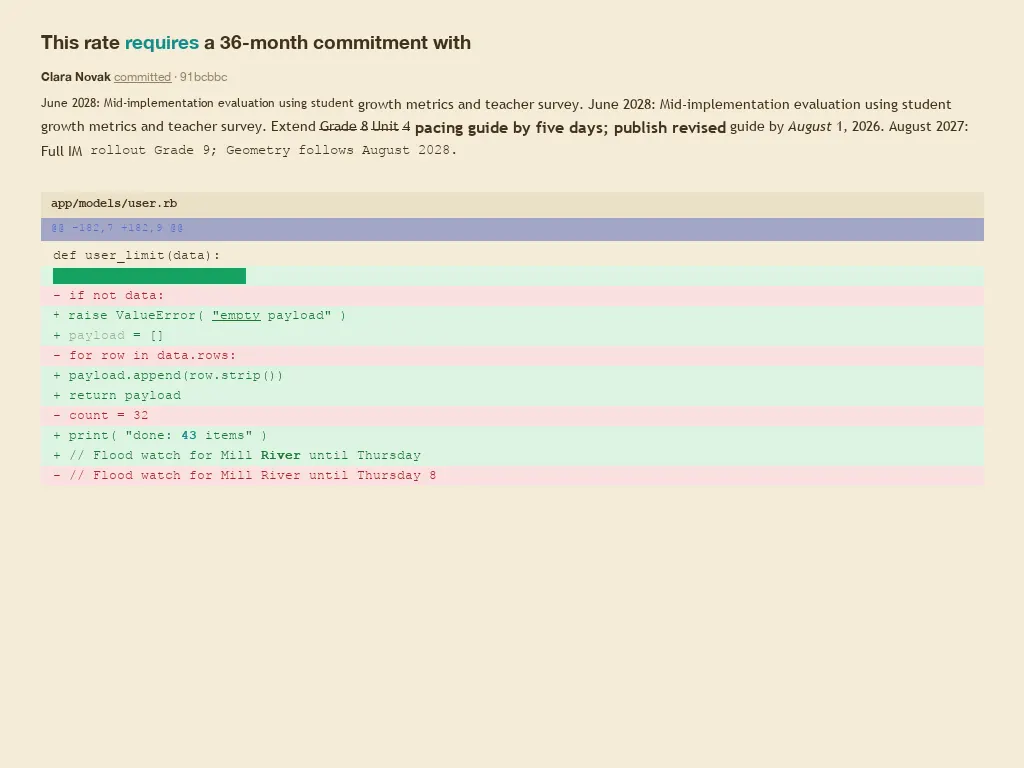
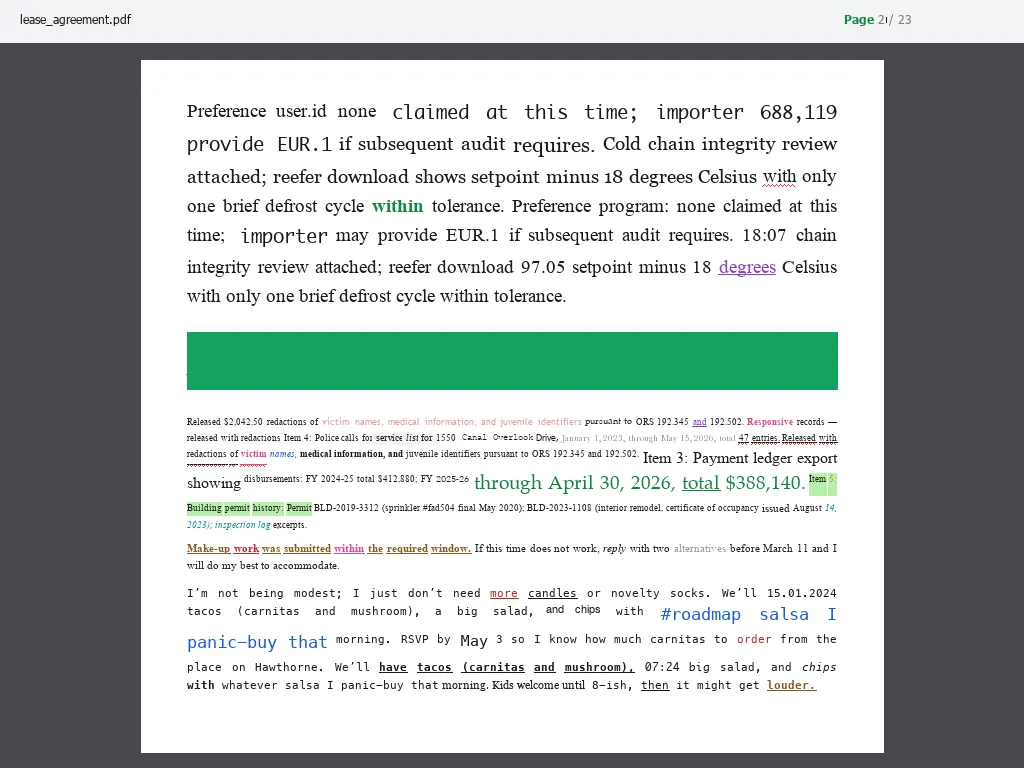
Text creates many small targets. A model must click words, characters, punctuation, line starts, blank lines, and caret positions between letters. Some rows ask for a full bounding box around a word, line, character, or paragraph. These targets are not normal objects. Synthetic text gives us exact glyph geometry and controlled cases.
| Data type | Count | Share | Categories |
|---|---|---|---|
| Caret | 187 | 37.4% |
caret_after_word 45caret_between_chars 36between_words 22caret_before_word 21line_end 17sentence_boundary 15paragraph_start 11line_start 10paragraph_end 9blank_line 1
|
| Word | 112 | 22.4% |
word_center 112
|
| Invoice | 70 | 14.0% |
invoice_recipient 9invoice_subtotal 6invoice_due_date 6invoice_number 6invoice_tax_id 5invoice_sender_city 5invoice_line_item 3invoice_line_items 3invoice_bic 3invoice_total 3invoice_tax 3invoice_sender_zip 3invoice_totals 2invoice_email 2invoice_date 2invoice_recipient_city 2invoice_phone 2invoice_bank_details 2invoice_iban 1invoice_recipient_zip 1invoice_sender 1
|
| Bbox | 64 | 12.8% |
word_bbox 31line_bbox 13char_bbox 10paragraph_bbox 10
|
| Char | 27 | 5.4% |
char_center 27
|
| Punctuation | 23 | 4.6% |
punctuation 23
|
| Chrome | 17 | 3.4% |
structural_text 17
|
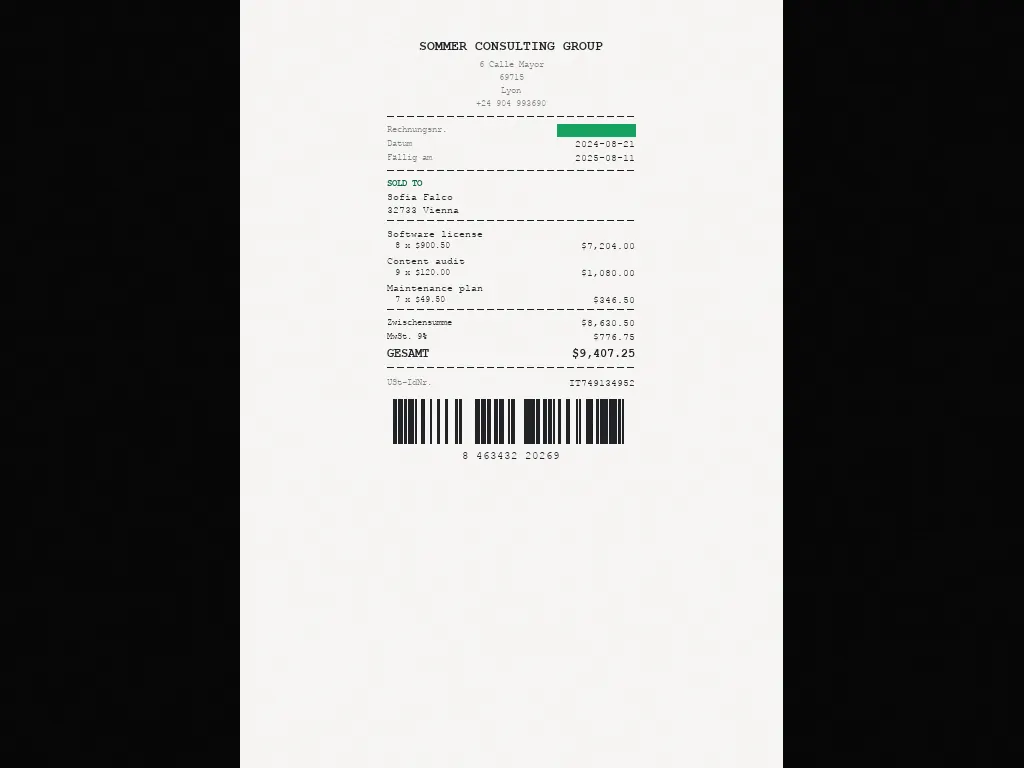
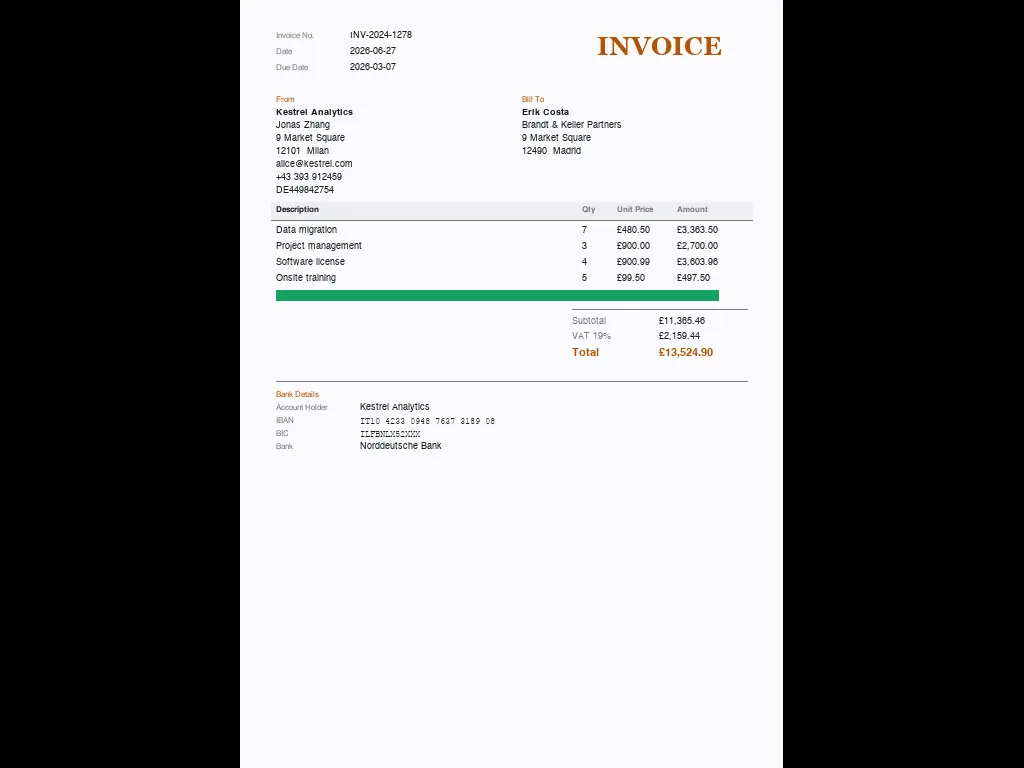
A dedicated invoice block adds 70 bounding-box targets over real invoice anatomy: invoice number, dates, sender and recipient blocks, individual line items and the full line-item table, subtotal, tax and VAT ID, total, and bank details (IBAN/BIC). These render on their own invoice surface so each field is an unambiguous target, and the line-item boxes include the header row and background bands rather than clipping the visible table.
The answer format is mixed: 366 examples ask for a point and 134 ask for a bounding box. Point examples use point-in-bbox scoring. Bbox examples use an asymmetric overlap rule (coverage at least 0.90 and precision at least 0.70) rather than plain IoU, so missing part of the target costs much more than overshooting it.
The language mix is 250 English examples and 50 examples each in German, French, Spanish, Italian, and Dutch. All non-English examples use Latin script.
Example instructions:
Mark the center of `loaf` before '17.99'.Grab the bounding area for "aloof" following «act».Box in the entire paragraph that opens with the last "In".Klik op "birželio".The typing position between the 't' and the "o" in 'cartons' right after '6'.
Selected examples

Pointerbench-Pro
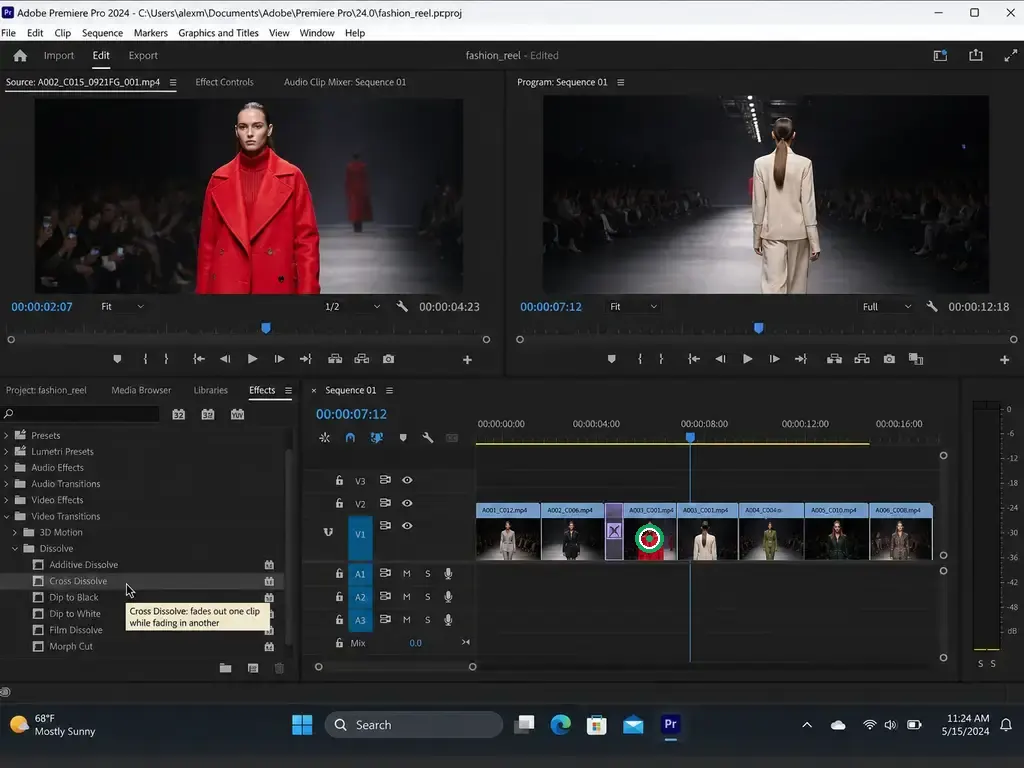
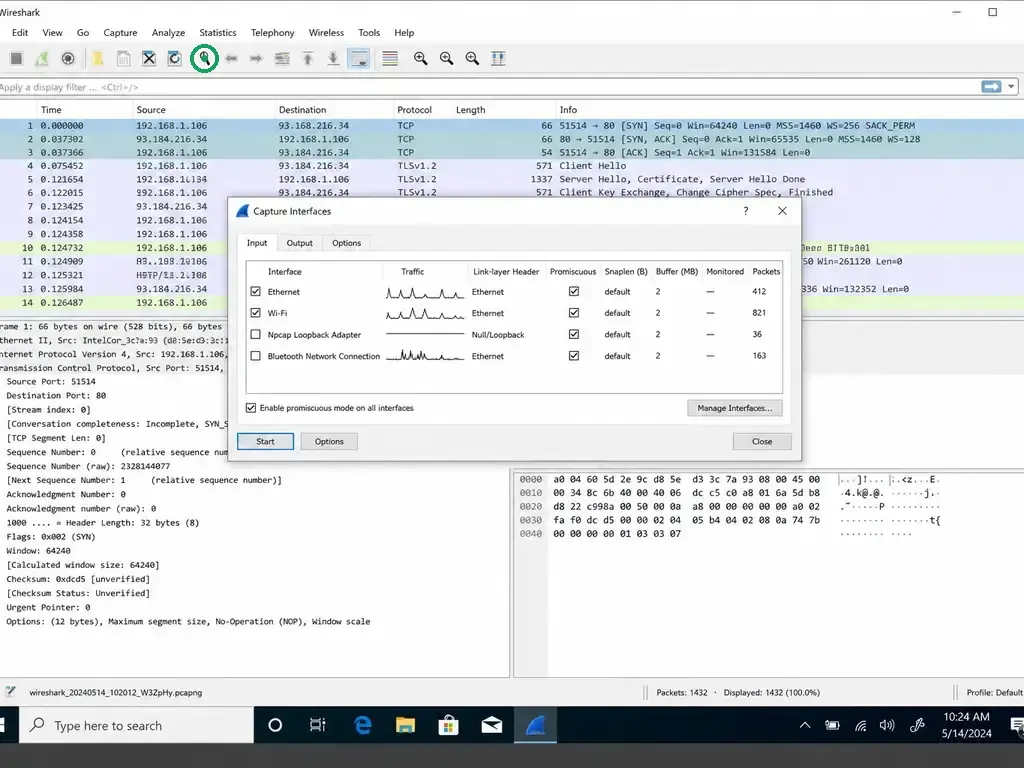
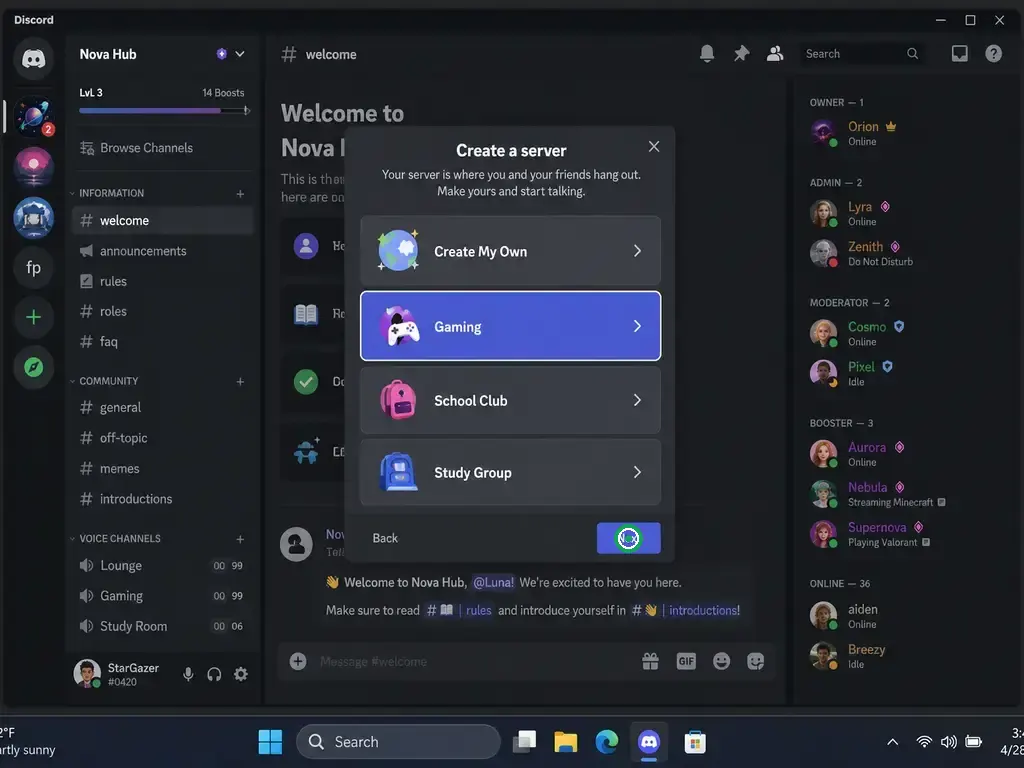
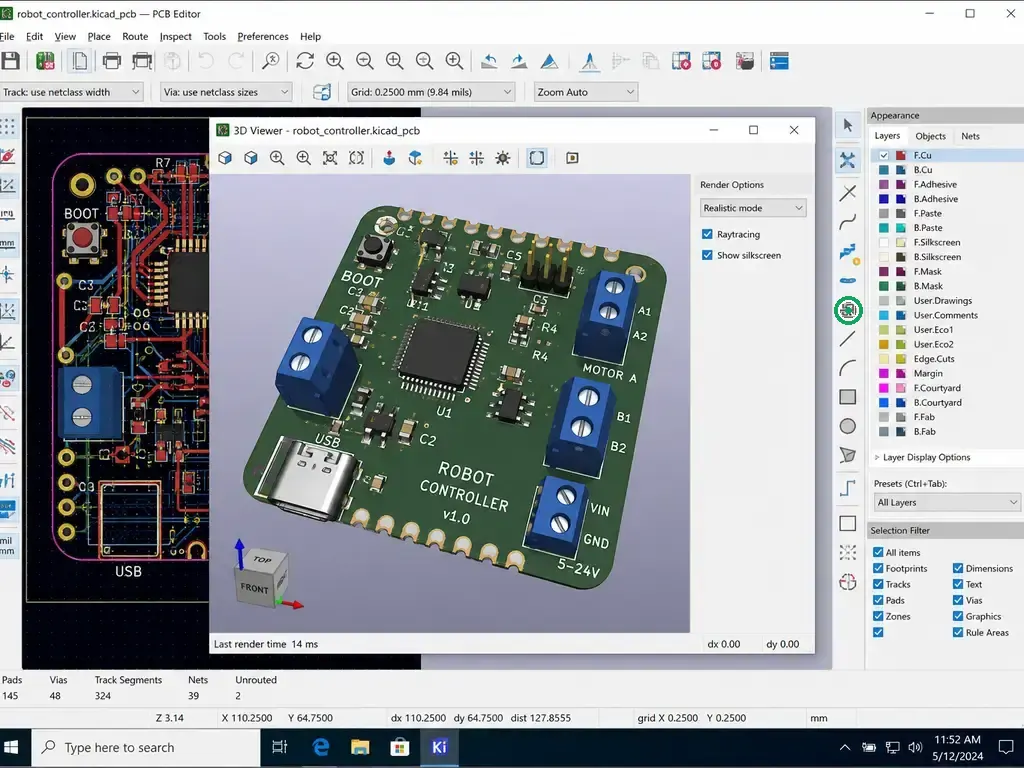
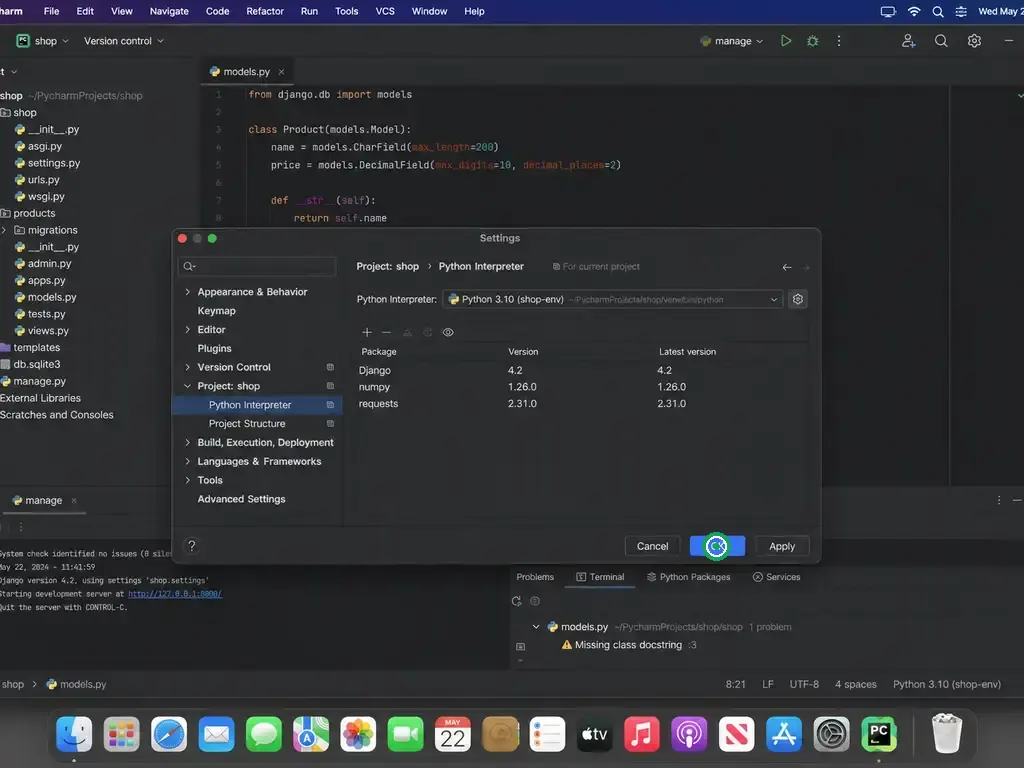
Professional applications are dense and specialized. They often make small targets harder to read than consumer web apps. Pointerbench-Pro complements ScreenSpot-Pro with generated GUI targets across professional software. The public set keeps the generated target mix instead of forcing an icon and text quota. Icon rows explicitly ask for the icon itself, so a model cannot pass by clicking the text label sitting next to it.
| Target type | Count | Share | What it tests |
|---|---|---|---|
| Icon | 190 | 38.0% | Compact toolbar controls, glyphs, buttons, and visual actions. |
| Other | 156 | 31.2% | Mixed GUI targets that are neither clean text labels nor pure icons. |
| Text | 154 | 30.8% | Labels, tabs, rows, file names, panels, and text actions. |
The benchmark covers 100 applications. Each record includes app, app_slug, app_category, platform, and source_id. You can report results by app or by app category.
The categories include development, creative tools, scientific tools, consumer apps, CAD and engineering, productivity, enterprise, office, communication, operating system surfaces, analytics, CMS, smart home, and finance.
Example instructions:
Find a packet.(Wireshark)Switch to Home.(Microsoft Word)Select the red-coat clip.(Adobe Premiere Pro)Open favorite symbols.(KiCad)
Selected examples

Format and evaluation
Each benchmark ships as an imagefolder dataset:
data/test/metadata.jsonl
data/test/0000.png
data/test/0001.png
...
Each metadata row contains the fields needed for scoring:
{
"file_name": "0000.png",
"id": "pbs_0000",
"instruction": "Click cell E11.",
"bbox": [x0, y0, x1, y1],
"point": [x, y],
"answer_type": "point",
"eval": {"type": "point_in_bbox", "bbox": [x0, y0, x1, y1]},
"data_type": "cell",
"category": "cell_ref",
"image_size": [1024, 768]
}
Predictions use JSONL. Each row contains an id and either a point or a bbox, depending on answer_type. A point is correct when it lands inside the target bbox. A predicted bbox is correct under the asymmetric overlap rule: it must cover at least 0.90 of the ground truth while keeping precision at least 0.70. Thin targets such as gridlines, cell corners, and carets have small boxes on purpose.
Why use synthetic data?
For Sheets and Text, synthetic data gives us exact geometry. That matters for gridlines, corners, caret locations, glyphs, colors, and relative positions. It also tests whether the model learned the structure, not just a familiar screenshot. If a model memorized common Excel layouts, it knows where A1 usually appears. Pointerbench can start the visible sheet at H23, remove the app chrome, scroll rows away, or ask for a boundary instead of a cell.
How to use Pointerbench
- Use
python eval.py --show-system-promptto print the recommended system prompt, or edit it for your inference stack. - Run a model on every image and instruction.
- Parse the model output as an absolute pixel point or absolute pixel bbox, depending on the row.
- Run
python eval.py --predictions preds.jsonl. - Report each subbenchmark separately.
git clone https://github.com/warmwindOS/pointerbench.git
cd pointerbench
huggingface-cli download WarmwindOS/pointerbench \
--repo-type dataset \
--local-dir .
cd pointerbench-sheets
python eval.py --show-system-prompt
python eval.py --predictions preds.jsonl
Release links
- Pointerbench GitHub repository
- Pointerbench dataset on Hugging Face
- Pointerbench-Sheets files
- Pointerbench-Text files
- Pointerbench-Pro files
- Our pointer model and Warmwind Robot Computer Use are internal for now; we will publish them in a later release.
References
- Warmwind OS: Building the AI Operating System for Everyone
- Warmwind: Autonomous Cloud Employees Enter Closed Beta
- ScreenSpot-Pro overview on HuggingFace
- ScreenSpot-Pro: GUI Grounding for Professional High-Resolution Computer Use
- ScreenSpot-Pro leaderboard (llm-stats.com)
- WebArena: A Realistic Web Environment for Building Autonomous Agents
- WebArena paper PDF